2026 | Beeline Professional release notes
The release details outline the major features and enhancements for Beeline Professional in 2026.
| Curious about what new and exciting features are coming next? Visit our Productboard page to explore our roadmap and the features our engineering teams are working on. |
General release Q4 | 2026
October
- Monthly timesheets and improved timesheets view
-
You can now configure the Timesheets time entry view in Beeline Professional under Engagements to support either a weekly or monthly timesheet view. The Talent Experience app has also been updated to provide a monthly calendar-based experience for submitting timesheets.
Key updates include:
-
A new Timesheet view setting is available in Beeline Professional under Engagements, where you can configure the view as Weekly or Monthly.
-
The Talent Experience app now supports a monthly calendar-based timesheet view.
-
Workers can enter time by day, including hours worked or clock in and out times.
-
Workers can save time entries throughout the month and submit one completed timesheet at the end of the month.
-
You can bill time by hours or by a monthly rate.
-
You can define daily thresholds and proration rules in timesheet rules so monthly rate calculations are based on the hours submitted by workers.
For more information, see Configuring proration rules for timesheets.
-
- Spend Detail Report engagement rate column accuracy
-
Beeline Professional now resolves engagement rate columns in the Spend Detail Report (SDR) using the rate in effect for each work day as it was known when the record was approved, rather than as it is known today. This change ensures that historical timesheet records in the SDR remain accurate for audit and reconciliation, even after retroactive rate corrections are applied to an engagement.
The SDR is used by clients to answer the question "what did this cost, as it stood at that time." Previously, engagement rate columns performed a live date-effective lookup that always reflected the latest rate data rather than the rates the record was calculated with. As a result, when a retroactive rate correction was applied on an engagement, previously approved timesheet records, that is, Original, Offset (
C), and Corrected (.1), silently drifted to reflect the new rate, even though nothing about those records had changed.Background on SDR rate columns:
The SDR contains two kinds of rate columns:
-
Allocation rate columns capture the rate actually applied to the timesheet line, which can be any rate, not just the Bill Rate. These columns are historically accurate because they are tied to the calculation at the time the timesheet was processed.
-
Engagement rate columns provide one column per rate code and were previously pulled as a live date-effective lookup. These columns were all affected by the drift issue, regardless of which rate code they represented.
Because Bill Rate appears in both column types, the drift could be masked at a glance. However, the underlying issue was not specific to any one rate field, any engagement rate column was affected.
Key updates include:
-
Engagement rate column lookups in the SDR now return the rate in effect for each work day as it was known at the record’s approval, rather than as it is known today.
-
Original records reflect the rate as known at their own approval and no longer drift when later corrections are applied to the engagement.
-
Offset (
C) records negate the billed value of the record they reverse. The offset uses that record’s rate rather than the rate at the moment of correction or the rate as of today. -
Corrected (
.1) records apply the same "as known at approval" logic, so they reflect the rates they were actually calculated with. -
The behavior applies independently to each record type across all engagement rate columns.
-
Records that are not yet approved continue to reflect the current rate, because they can still be recalculated.
This change affects how engagement rate columns are populated in the SDR only. Allocation rate columns are unchanged because they were already historically accurate. Clients who reconcile against the SDR should expect engagement rate columns on historical records to remain stable following retroactive engagement rate corrections. -
General release Q3 | 2026
September
- Finance snapshot exports
-
Beeline Professional now delivers a copy of the spend report Beeline’s Finance team uses to determine billing amounts to your instance, so you and Beeline can reference the same figures in a spend conversation.
Some customers on Invoicing 1.0 have agreements with Beeline based on total spend. Unlike Invoicing 2.0 customers, they don’t generate invoices on a set cadence, so there was previously no consistent, shared report for Beeline’s Finance team and the customer to reference.
Key updates include:
-
Each time the spend report is generated for Beeline Finance, a copy is also added to in your Beeline Professional instance, giving MSP and PMO users direct access.
-
The report comes in one file: {site name} - {time period} - Beeline Finance Detail Report. A detailed spend report where each row is a single timesheet or expense allocation within the time period.
By default, users with the PMO or PMO Admin role can view this report, controlled by the Finance Snapshot Reports permission. To grant access to other roles, go to and add the roles you want.
-
- Zero-amount timesheets in invoice blueprints
-
You can now configure invoice blueprints in Beeline Professional to include zero-amount timesheets in invoice runs. Previously, zero-amount timesheets remained in Approved status indefinitely because they were silently excluded from blueprint runs, making it difficult for finance teams to confirm that the full timesheet population was accounted for.
Key updates include:
-
A new Include zero amount Timesheets setting is available at the blueprint level to control whether zero-amount timesheets are captured by invoice runs.
-
When the setting is On, zero-amount timesheets are captured by the blueprint run, move from Approved to Invoice Pending to Invoiced, and appear as line items in the batch file.
-
When the setting is Off, zero-amount timesheets are not captured. They keep the Approved status and do not appear in the batch file. This matches the previous behavior.
-
Because a zero-amount timesheet carries no currency of its own, currency is resolved from the worker’s engagement at the time of the timesheet. Beeline Professional uses the Bill Rate currency, falling back to the Pay Rate currency if the bill rate currency is not available.
For more information, see Creating invoice blueprints and Editing invoice blueprints.
-
- Candidate skills in job applications
-
Beeline Professional now surfaces candidate skills submitted by suppliers in the Beeline Supplier Network directly within the Review Candidate Details smart form task in Professional.
A new Supplier Selected Skills section is available as a smart form element on the Job Application. It displays only the skills manually added by the supplier during candidate submission, so PMOs and hiring managers can review that information within their task workflow in Professional. They can still open the candidate details from the Job Posting if they need to review the candidate record there.
August
- Contract change review workflow
-
Beeline Professional now supports a review and approval workflow for contract changes, giving managers and Project Management Office (PMO) users control over which updates are committed to a contract before they take effect. This change prevents rejected updates from propagating incorrect data to downstream financial systems.
Key updates include:
-
Proposed contract updates are captured as pending changes and routed through a review task before they are committed to the source contract record.
-
Approved changes are applied to the contract and propagated to downstream systems.
-
Rejected changes leave the original contract values unchanged.
-
The change set includes all delivered and custom fields.
-
A Pending Changes alert appears in Contract Details when open changes exist. The alert links to the Change History tab.
-
Pending changes do not trigger any processes until they are approved or rejected.
-
The Start Event for the Contract resource type has a new Contract Changed starting condition to trigger a process when specific fields change.
-
The Approve Change user task is available in the process definition Palette for the Contract resource type in processes.
For the contract review and approval workflow to work, you must configure it as part of the existing approval process. For more information, see Enabling contract change review workflow.
-
- Candidate duplicate check
-
You can now check candidates submitted by suppliers for duplicate records, merge duplicate records, and confirm whether candidates have previously worked for your organization and are eligible for rehire. These capabilities help program administrators make informed rehire decisions, prevent duplicate worker records, and enforce organizational rehire policies.
Key updates include:
-
Run duplicate checks at any point in the sourcing flow. Check submitted candidates against existing worker records to identify potential duplicates.
-
Use the Rehire Eligibility flag in workflows. If a worker is marked as ineligible for rehire in the system, the duplicate check clearly identifies the worker as Do Not Rehire (DNR).
-
Merge duplicate records directly from the duplicate check. Program administrators can merge a candidate record with an existing worker record into a single record. This replaces the previous linking mechanism, which hid duplicate records as secondary records.
For more information, see Candidate duplicate check.
-
July
- Supplier type classification
-
You can now classify suppliers as either staffing suppliers or independent contractors in the Suppliers hub, making it easier to identify supplier types when adding them to contracts.
To enable supplier type classification in Beeline Professional, go to and enable the Supplier Type toggle.
Key updates include:
-
Beeline Professional administrators and PMO users can classify a supplier as a staffing supplier or an independent contractor in the Suppliers hub. A new Supplier Type column displays the type assigned to each supplier.
-
Supplier type is visible in the Suppliers hub, the Supplier Profile, and when adding a supplier to a Contract Smart Form.
-
The MSP option has been removed as a contracting party option on contracts. Any existing contracts with MSP as the contracting party have been migrated so the Contracting Party field is empty.
-
Supplier type is available as a selectable column in the following reports:
-
Headcount Tracking
-
Spend Detail Report
-
Contract Spend Report
-
Suppliers hub export
-
Supplier type does not introduce compliance, legal, or tax classification workflows, and it does not modify downstream contract rules or policies based on supplier type. -
- Tasks page side panel layout update
-
The layout of the user Tasks page, available from the main navigation menu under Tasks, has been updated to reduce visual clutter and help you focus on the task at hand.
Previously, the tasks used a three-column layout that displayed the task list, main content, and task details side by side. Beeline Professional now hides the large amount of information and details that aren’t always immediately relevant to the task flow, so you can focus on completing the task at hand.
Key updates include:
-
The Task Details panel is no longer persistently visible on the Tasks page.
-
Task details now open as a slideout drawer, giving the main content more space and reducing on-screen clutter.
-
The task list and main content remain visible, so you can review and act on approvals without switching context.
-
- Contact Phone country code restriction
-
You can now limit the country codes that users can enter in the Contact Phone smart form component. To enable this restriction, configure the Contact Phone smart form element as required.
Smart form example configuration:
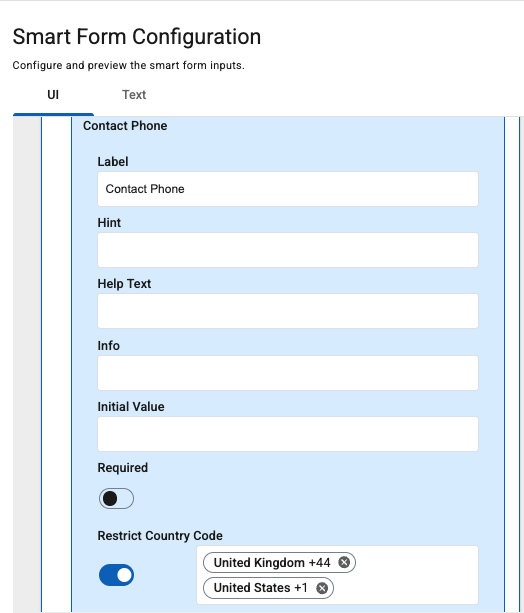 Figure 1. Restrict Country Code smart form element configuration
Result in Beeline Professional:
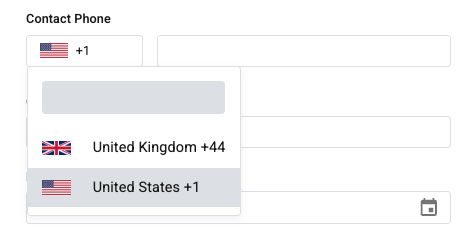 Figure 2. Configured Contact Phone in Professional
General release Q2 | 2026
June
- Supplier View Transaction Data File configuration
-
When configuring an invoice batch in Beeline Professional, you can now independently control which columns appear in supplier-facing and finance-facing invoice transaction data files, using the new Supplier View Transaction Data File section.
Key updates include:
-
A new Supplier View Transaction Data File configuration is available when creating invoice blueprints.
-
Program administrators can configure the supplier-facing data file independently of the internal finance-facing data file.
-
You can aggregate fee columns, such as combining MSP, VMS, and Other fees into a single Total Fees column, in the supplier view.
-
Sensitive fee structures and tax breakdowns can be excluded from supplier-facing files while remaining available in finance-facing files.
For more information, see Creating invoice blueprints.
-
- Contract settings page
-
Beeline Professional now provides a dedicated Contract settings page in Settings. This page gives Beeline Professional administrators and PMO users a self-service location to manage contract feature configuration without navigating through the Tenant Configuration YML page or relying on engineering to change feature flags.
Key updates include:
-
A master Contract Configuration toggle is available on the Contract page.
-
The following child settings are available under the master toggle:
-
Milestone
-
Date Validation
-
Currency Validation
-
Supplier Validation
-
Budget & Spend Validation
-
-
- Batch by supplier for invoice blueprints
-
When configuring an invoice batch in Beeline Professional, you can now automatically include all current and future suppliers in invoice runs without updating the blueprint when new suppliers are onboarded.
Previously, invoice blueprints required you to specify each supplier individually. This option is still available.
Key updates include:
-
Batches configured for all suppliers cannot be combined with other entity filters.
-
New suppliers are automatically included in subsequent invoice runs without requiring blueprint edits.
For more information, see Creating invoice blueprints.
-
- Additional process instance filters
-
Beeline Professional now provides additional filters for process instances, making it easier for administrators to locate specific sets of processes.
Previously, you could filter process instances by process Definition Name and Process Status only.
These new filters are enabled by default for all tenants and are available in the Filters slideout under :
-
Resource Type (for example, Engagement, Timesheet)
-
Initiator (including “system”)
-
Started/Completed Date
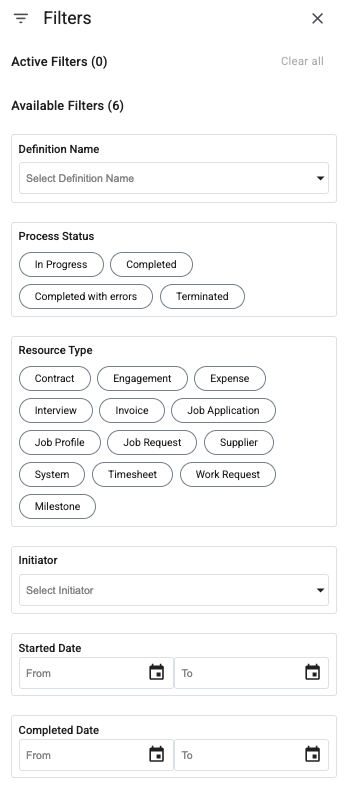 Figure 3. Process instance filters
 -
- Invoice IDs in Time & Expenses hub
-
Beeline Professional now displays invoice IDs in the Time & Expenses hub, so you can quickly find timesheets and expenses associated with a specific invoice.
This update also makes the same invoice IDs available in the Supplier Network Application in the Timesheets and Expenses hubs.
Key updates include:
-
Two new columns are available on the Timesheets page and the Expenses page in the Time & Expenses hub:
-
Consolidated Invoice ID
-
Supplier Invoice ID
-
-
Beeline Professional generates both IDs when you run an invoice blueprint in Professional, import records with the Data Import tool, or receive submissions from a supplier through the Supplier Network Application.
-
Beeline Professional populates both columns only for records with a status of
InvoicedorInvoice Pending. -
If a timesheet or expense is included in multiple preliminary invoices, all associated preliminary invoice IDs appear in the relevant column.
-
You can search for timesheets and expenses by Consolidated Invoice ID or Supplier Invoice ID in the Time & Expenses hub.
-
- Constrain cost center by company
-
You can now configure a cost center and company constraint matrix in engagements, work requests, and job postings. This enhancement allows you to restrict the cost center values displayed in the reference data drop-down based on the selected company, and vice versa.
Constraints are applied dynamically and work bidirectionally, ensuring consistent data entry across forms.
We recommend configuring constraints with Company as the constraining field and Cost Center as the dependent field. This structure aligns with spreadsheet import and export templates, where rows typically represent constrained values and columns represent constraining values. To set up the constraint, go to . For small datasets, configure values directly using the drop-down lists. For larger datasets, use the export and import functionality to manage constraints in a spreadsheet.
For more information, see Field metadata constraints.
May
- Support for job posting cancellation reason fields in process mappings
-
Business events capture key actions and status changes within sourcing and onboarding workflows, including approvals, rejections, and cancellations. These events can also include contextual information such as reasons and comments entered by users.
To improve workflow flexibility and reporting capabilities, reason data from business events can now be used within process configurations, including data mapper inputs and exclusive gateway conditions.
This enhancement introduces support for job posting cancellation reason custom fields in the Business Rule Mapping Task [Job Posting]. We’ve added the following custom fields to the task:
-
Cancelled Reason
-
Cancelled Reason Reference ID
-
Cancelled Comment
This functionality enables customers to use cancellation context in downstream process logic, such as escalations, notifications, and custom routing decisions.
-
- Pause and resume job postings
-
Users can now pause and resume job postings. This enhancement allows temporary suspension of candidate activity without closing the job posting or losing approvals and budget data.
When a job posting is paused:
-
The status of the job posting changes to Paused.
-
New candidates cannot be added.
-
New job applications cannot be submitted.
-
New suppliers cannot be invited.
-
The job posting is also paused in the Beeline Supplier Network application.
-
You can resume the job posting at any time.
To enable this functionality, administrators must create and deploy the Pause and Resume Job Posting processes in Beeline Professional. For setup instructions, see Configuring a Pause Job Posting Process and Configuring a Resume Job Posting Process.
-
- Expanded custom field support in Fulfillment report templates
-
We’ve expanded custom field support in Fulfillment report templates to provide more flexible filtering and reporting options. This enhancement helps you refine report results and include additional custom application data in your reporting output.
The following updates are now available:
-
Added job application custom fields as filters in the Fulfillment: Candidates report template.
-
Added job posting custom fields as filters in the Fulfillment: Distribution report template.
-
Added job application custom fields as columns in the Fulfillment: Candidates report template.
-
- New Summary column added to Job Families
-
We’ve added a new Summary column to the Job Families table in the Job Catalog. It provides additional details about a specific job family. This field is optional.
To add or update Summary information:
-
Go to .
-
Either:
-
Edit an existing job family.
-
Import job family group data by using the default import template.
-
-
- Removed the ability to create job profiles during job posting creation
-
We removed the ability to create new job profiles during the job posting creation process. Users can now select only existing job profiles configured in , which improved consistency and governance of job profile data across the system.
Previously, users could add a new job profile while creating a job posting, and the new profile was automatically added to the Job Profile catalog for future use. After this update, the job posting workflow supports only approved and centrally managed job profiles and prevents users from adding profiles outside the configured catalog.
- Configurable access to the Terminate Process action
-
A new attribute-based access control (ABAC) capability has been introduced to provide finer-grained control over process termination.
Previously, the default ABAC policy for the Process Instance resource granted general users read and update permissions. This access is required for users to view and complete tasks within processes. However, it also implicitly enabled the ability to terminate processes. The Terminate action is available in both the All Tasks view and the tab, which may not be desirable in all configurations.
To address this, a new ABAC resource field, Terminate Process, has been added under the Process Instance resource. This enhancement allows administrators to restrict process termination independently of other process interactions.
By defining a DENY policy for the Terminate Process field, administrators can prevent selected users from terminating processes without impacting their ability to view or complete tasks.
For steps on how to enable this feature, see Configuring the Terminate Process action for users.
- Standardised invoice, batch, blueprint, and notification statuses
-
We’ve introduced a unified status model for invoices, batches, and blueprints across process configurations and notifications, ensuring consistent and clearer status tracking throughout the system.
Statuses are now aligned across the Invoices hub and notifications, making it easier to track progress and communicate with suppliers.
Key improvements include:
-
Consistent statuses across the platform: Invoice, batch, and blueprint statuses now follow a standardised model.
-
Clear separation of responsibilities:
-
Invoice statuses reflect the overall invoice state
-
Batch and blueprint statuses reflect processing states
-
-
Simplified and aligned status sets: Deprecated and inconsistent values have been removed or standardised.
-
Process updates:
-
Statuses used in process configurations are now aligned
-
Deprecated values are automatically mapped to the new set
-
Existing processes have been updated automatically; no action needed
-
For detailed descriptions of the standardised statuses, see Invoice statuses.
-
- Supplier invoice approval and status updates
-
The supplier invoice experience has been improved to streamline invoice approval workflows and provide clearer status visibility.
Key updates include:
-
Added a new Approve Invoice task to the Invoice process workflow.
-
Added Approve and Reject actions in both the Invoices hub and the Tasks hub, allowing users to process invoices directly from either location.
-
Updated invoice status labels to refresh immediately in the Invoices hub after an approval or rejection action.
-
Added automatic creation of an Approve Invoice task in the Tasks hub when a supplier submits an invoice for approval.
-
- Contracting party alignment between contracts and engagements
-
The system now enforces contracting party alignment between contracts and associated engagements to improve consistency across the contingent workforce program. In this update, the terms Contracting Party, Supplier, and Vendor are treated as equivalent.
These changes help reduce supplier data inconsistencies between contracts and engagements, strengthen invoicing and financial reporting accuracy, and support more reliable workforce program governance.
Key updates include:
-
Users can create a contract without specifying a contracting party.
-
When associating an engagement with a contract, the engagement supplier must match the contract supplier. If the suppliers do not match, the system prevents the association.
-
Users cannot add milestones to a contract unless the contract has a contracting party defined.
-
Users can change the contracting party on a contract only when no engagements are associated with that contract.
-
If a contract does not have a contracting party and a user attempts to associate an engagement, the system displays an error message.
-
- External approvers available in job postings and job applications
-
External approvals in Beeline Professional allow organizations to include non-Professional users in approval workflows through secure, email-based approval links. This enhancement extends external approver support to the job posting and job application models, enabling customers to assign already configured external approvers earlier in the sourcing lifecycle and carry those assignments through to engagement.
Key updates include:
-
You can now set primary and alternate external approvers on job postings and job applications.
-
Smart form elements are available to manage external approvers throughout the sourcing process.
-
Data mapping and business rule tasks now support external approvers as inputs and outputs.
-
External approver assignments configured during job posting can now flow through job application to engagement.
This functionality is enabled by default. Customers using external approvers should update relevant sourcing processes and smartforms to manage the new fields. For more information on external approval, see About External Approval.
-
April
- Job profile availability is now controlled by the Assignable setting
-
You can now control whether a specific job profile is available for selection when creating a new job posting, engagement, or other applicable workflow in Beeline Professional by enabling or disabling its Assignable setting. This helps keep selection lists relevant while preserving existing data and reporting.
Key improvements include:
-
Assignable setting for job profiles: Set each job profile to Enabled or Disabled.
-
Control where profiles can be selected:
-
Enabled: The job profile is selectable in job postings, engagements, and other applicable workflows.
-
Disabled: The job profile is not selectable in new or updated records.
-
-
No impact on existing data. Disabled job profiles:
-
Remain visible in the job profiles list.
-
Stay assigned to existing job postings and engagements.
-
Continue to appear in reports.
-
The Status setting is read-only in Professional and cannot be edited manually. Status can be Active or Inactive. It is managed through Workday sync or the Data Import tool only. Changes made in Workday are reflected in Professional, and vice versa. For instructions on how to use the Assignable setting, go to Controlling job profile availability for selection.
-
- Timesheet attachments
-
Workers and suppliers can now upload supporting documents when submitting timesheets, helping meet customer-specific requirements such as overtime justification or scanned copies of signed timesheets. This capability reduces submission friction for workers and suppliers, ensures compliance with customer documentation requirements, and improves review efficiency for managers.
Key improvements include:
-
Attachment support for timesheets: Workers and suppliers can upload files directly during timesheet submission.
-
Manager visibility: Attachments are available to managers during review in the Time & Expenses hub and on the worker’s profile.
-
Configurable requirement: A new Require Attachments setting is available at .
-
Default: Disabled
-
When enabled, attachments are required for timesheet submission.
-
Supported file types:
-
Word:
.doc,.docx -
Excel:
.xls,.xlsx -
Images:
.png,.jpg -
PDF:
.pdf
For more information, see About timesheet settings.
-
- Prevent import conflicts with pending engagement changes
-
The Import Data tool now detects engagements with pending changes to prevent updates from being unintentionally overwritten by later approvals.
Key improvements include:
-
Conflict detection: Engagements with pending changes are flagged during import.
-
Resolution options:
-
Overwrite pending changes, or
-
Exclude affected rows
-
-
More reliable bulk updates: Reduces the risk of imported changes being reversed later.
-
- New Contract Spend Report template
-
A new Contract Spend Report template is now available in the Reports hub, providing PMO and MSP users with enhanced visibility into contract performance and budget utilisation.
This report enables users to track contract spend and monitor progress against approved budgets, including spend from timesheets, expenses, and milestones.
The report includes configurable fields and filters, allowing users to tailor insights to their specific reporting needs. For milestones, all available fields have been included to provide comprehensive visibility. For engagements, a limited set of fields is currently available.
This report template is only available when the Contract feature is enabled on the tenant. Key capabilities include:
-
Tracking contract budgets against actual spend to support financial oversight
-
Monitoring milestone budgets across invoiced, approved, and pending states
-
Viewing engagements associated with each contract
-
Viewing milestones associated with each contract
-
- Bulk timesheet corrections
-
PMOs and hiring managers can now perform bulk timesheet corrections using the Import Data tool. This enhancement introduces a new Timesheet Correction CSV template that allows users to make multiple updates offline and import them in a single action, eliminating the need to edit entries individually in the UI.
This update reduces manual effort, improves efficiency, and supports customers who rely on third-party timekeeping systems by enabling streamlined import and correction of timesheet data.
For instructions on how to perform bulk timesheet corrections, see Correcting timesheets in bulk.
- Consistent date and time formatting in reports and exports
-
All reports, for example, Spend Detail Report, Headcount Report, or Worker Eligibility Report, now use the date and time format set at the tenant level in Settings. The same formatting also applies to exports from all hubs, for example, timesheets exports, expenses exports, or engagements exports, as well as invoice blueprint outputs.
This update ensures consistency across the application and exported files, reducing discrepancies and improving readability for users.
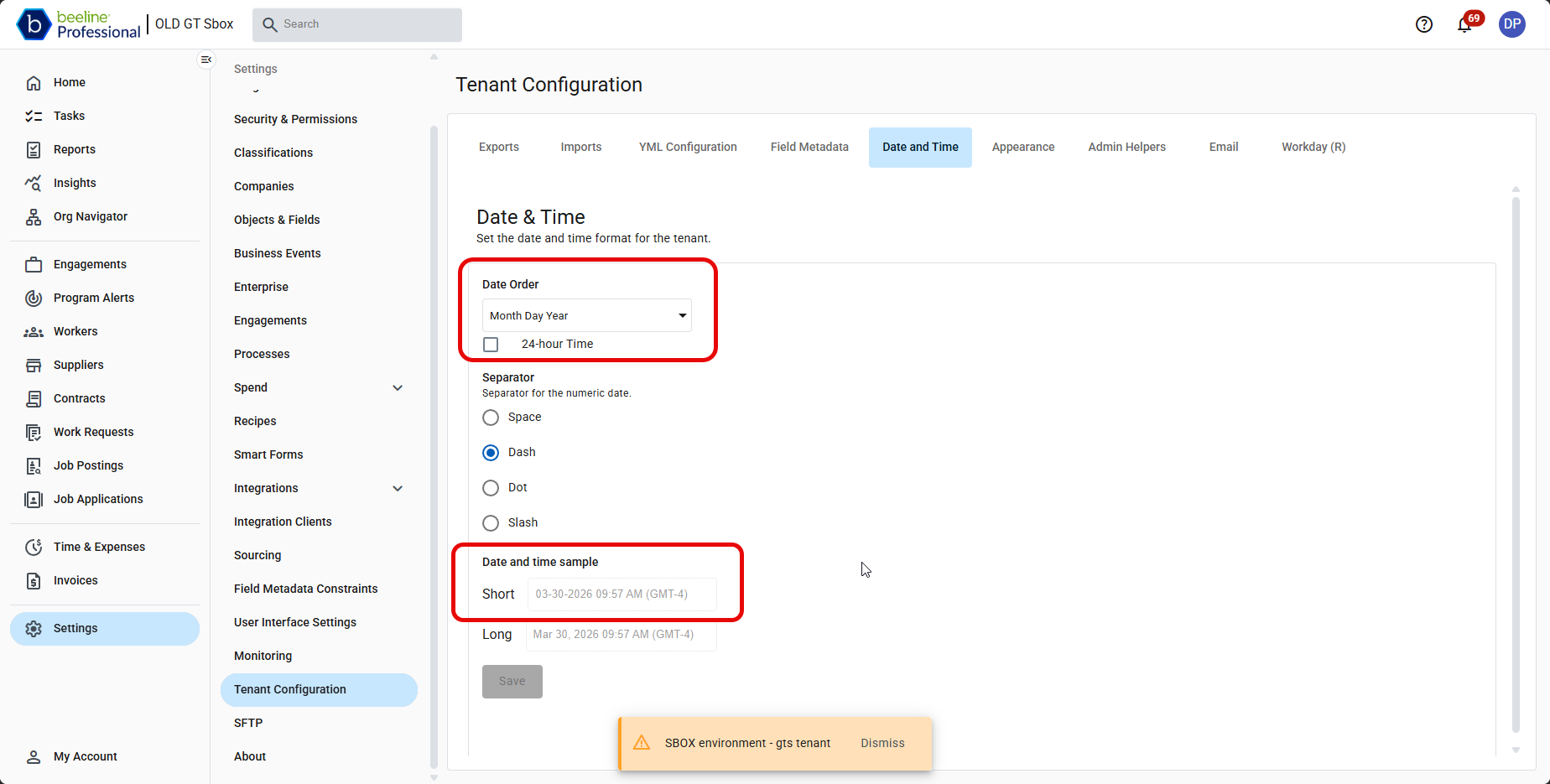 Figure 4. Date and time format configuration
- Contract Details page enhancements
-
We’ve updated the Contract Details page to improve usability, organization, and responsiveness across devices.
-
The Manage Contract action has moved from the page header into a new Manage Contract button located below the contract status.
-
The View Change History action is now available as a standalone button located below the contract status.
-
The Delete contract action is now located in the overflow menu located below the contract status to reduce accidental use.
-
A new Contract Duration section displays:
-
Contract length
-
Start and end dates
-
A progress bar to visualise contract duration
-
-
The page layout now adapts to smaller screen sizes. Elements automatically wrap for a more accessible and user-friendly mobile experience.
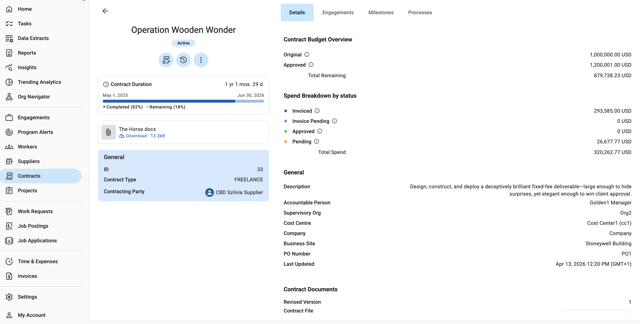 Figure 5. Contract Details page
 -
- Spend Limit warning for contracts
-
A new Spend Limit warning has been introduced to improve visibility into contract-level spending and support proactive budget management.
The system displays a warning message when total contract spend exceeds the approved contract budget. Contract spend includes milestones as well as timesheets and expenses once they have been submitted for payment.
This feature helps Beeline Professional users monitor financial compliance and stay informed of budget status without interrupting workflow. The warning serves as a notification only and does not block transactions or processing.
- Business site and cost center constraints
-
You can now extend field metadata constraints to Business Site and Cost Center fields in engagements, work requests, and job postings. This enhancement allows you to restrict the cost center values displayed in the reference data drop-down based on the selected business site, and vice versa.
Constraints are applied dynamically and behave bidirectionally at runtime. A selection in one field filters the available options in the related field across forms, ensuring consistent data entry.
We recommend configuring constraints with Business Site as the constraining field and Cost Center as the dependent field. This structure aligns with spreadsheet import and export templates, where rows typically represent constrained values and columns represent constraining values. You can configure a small number of constraints directly in the application using drop-down lists. For larger datasets, use the export and import functionality to manage constraint data efficiently.
For more information, see Field metadata constraints.
- Expense multi-approval
-
We introduced multi-approval for expense processing, enabling sequential approval from more than one manager. The process works as follows:
Submission
Sent to the first-level approver (hiring manager or accountable person)
-
If rejected, worker is notified; process ends
-
If approved, the expense is routed to the next approver in the sequence
-
If rejected, worker is notified; process ends
-
If approved, this continues until all required approvals are completed
-
After final approval, the worker is notified; expense is marked Approved; process ends
-
A Mark Expense as Approved system step ensures the expense status is updated after final approval. This step must be added manually to existing processes (if missing) as part of implementation.
Single-approval remains available and is fully configurable. Expenses can be routed to any designated approver or role, and the same approval flow can be applied across all expense types or configured differently based on business needs.
Enablement
Contact your Beeline Customer Success Manager to enable this feature. This feature is tenant-specific and requires:
-
Migration of existing expense processes
-
Activation of the feature flag
-
General release Q1 | 2026
March
- Milestone due date validation against contract duration
-
Milestone due dates are now validated against the associated contract to ensure alignment with contractual timelines and data accuracy. This update prevents milestones from being scheduled outside the contract duration and improves consistency in planning and reporting.
Existing milestones with invalid dates aren’t automatically updated; validation applies to all new and edited records. The update introduces the following validations:
-
Enforces date boundaries:
-
Milestone due date must be on or after the contract start date.
-
Milestone due date must be on or before the contract end date.
-
-
Allows boundary values (dates equal to contract start or end).
-
Applies validation to UI, API, and import processes.
-
Blocks save or update when validation fails.
-
Displays validation messages when the due date falls outside the contract duration.
-
- Engagement date validation against contract duration
-
Engagement dates are now validated against the associated contract to ensure alignment and data integrity. This update prevents engagements outside the contract duration and improves consistency in scheduling and reporting.
Existing invalid engagements aren’t auto-corrected and will be updated separately. The update introduces the following validations:
-
Enforces date boundaries:
-
Engagement start date must be on or after the contract start date.
-
Engagement end date must be on or before the contract end date.
-
-
Requires an end date when a start date is provided.
-
Allows boundary values (dates equal to contract start or end).
-
Blocks save when validation fails.
-
Displays validation error messages when dates fall outside the boundaries.
-
- Expanded access to All Tasks panel
-
The All Tasks panel, accessible from the main navigation menu under Tasks, was previously restricted to administrators. With this update, selected roles can now access the panel using an appropriate Attribute-Based Access Control (ABAC) policy. Full access for administrators remains unchanged. This enhancement enables critical task management by specific user roles while maintaining security and performance safeguards.
Key changes
-
ABAC-based access: A new ABAC resource All Tasks controls access to the All Tasks panel independently of the underlying target entity. Users with All Tasks read and update permissions can view all tasks in the panel. Access to task details remains governed by existing ABAC rules on the underlying entity. Users without entity access see a “you do not have access to see this task” message.
-
Actions supported: Users with All Tasks permissions can perform task-level actions (delegate, cancel, terminate), including bulk operations. Note that terminating processes also requires a policy enabling read and update permissions on a process instance.
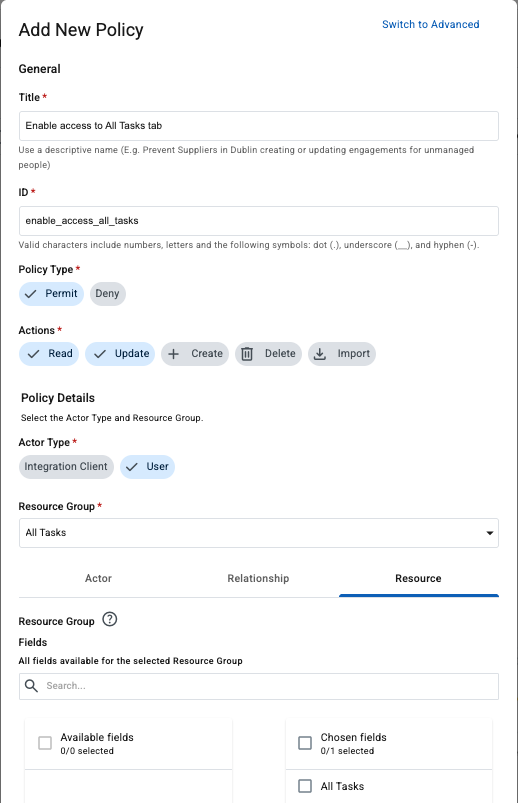 Figure 6. Configuring ABAC for All Tasks
-
- Deep links in email notifications
-
We have introduced deep linking within email notifications to enable users to navigate directly to relevant tasks and records in the application. The feature is available to all users and supports all resource types.
This enhancement reduces the need for manual navigation, helping users access information faster, respond to approvals more efficiently, and complete tasks with fewer steps.
What’s new
Email notifications now include contextual links that direct users to the specific task or underlying record referenced in the notification.
User task notifications now include a View Task button, which links directly to the associated task and its underlying entity.
Custom notifications now include a View [Entity Type] button, which links directly to the relevant record.
Supported scenarios
This enhancement supports common user workflows, including:
-
Accessing tasks directly from email notifications to review details or complete actions
-
Navigating to approvals from email notification messages to take timely action
-
Reviewing and updating submitted items (for example, corrections or follow-ups) more efficiently
-
- New columns in Headcount Tracking and Standard reports
-
We added the following columns to the Headcount Tracking and Standard reports:
-
Number of Current Engagements (Integer)
-
Primary Engagement ID (Alphanumeric)
Example:
First name Last Name Engagement ID Number of Current Engagements Primary Engagement ID Florina
Worker CBD
755-000003
2
755-000003
Florina
Worker CBD
755-000004
2
755-000003
-
- Units of work for time entry
-
Organizations that track time as fractions of a working day can now enable units-based time entry in addition to standard hours. This approach is commonly used in some regions where work is recorded as portions of a day (for example, 0.5 for half a day) instead of hours.
Units represent fractions of a working day (0.25, 0.50, 0.75, 1.0) and now appear on invoice files, timesheet approvals, and Spend Detail Report. The feature is disabled by default and must be enabled per customer. Hours-based time entry continues to work unchanged.
You can define how workers enter time when configuring time codes:
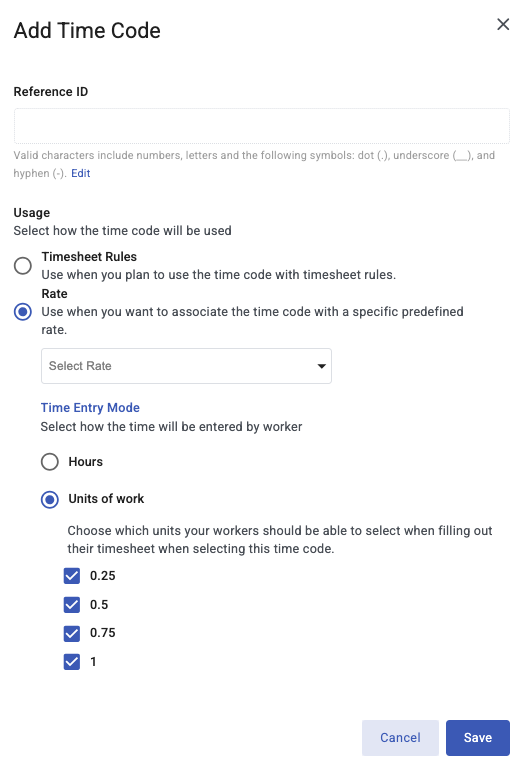 Figure 7. Configuring units of work
For more information, see About monthly, daily, and unit-based rates and Configuring time codes.
- Currency validation for engagements and milestones
-
The system now validates currency when you create or update an engagement or milestone.
The engagement or milestone currency must match the contract currency. If the currencies don’t match, the system displays the following error message:
The engagement or milestone currency must match the contract currency.
- Total fee fields
-
This release adds new total fee fields to improve visibility and reporting for managed services provider (MSP), vendor management system (VMS), and other fees across Beeline Professional.
-
Fee types
When you create a new fee in Beeline Professional, you can now select one of the following fee types: MSP Fee, VMS Fee, or Other fee.
-
Spend Detail Report
The Spend Detail Report now includes three new columns that show the total amount for each fee type: MSP Fees, VMS Fees, or Other Fees.
-
Invoice blueprints
When you create or edit invoice blueprints, three new data fields are available in Step 5: Transaction Data File column definitions: MSP Fees, VMS Fees, or Other Fees.
-
- Consolidated invoicing now supports supplier-created invoices
-
Consolidated invoicing now allows suppliers to create and submit their own invoices using the automated invoicing setup. If your program uses invoicing blueprints to define invoice file structure and run cadence, you can now include suppliers directly in the process.
You can enable it by turning on Allow suppliers to submit invoices in .
How it works
-
When a supplier-specific automated invoicing batch runs, the supplier is notified.
-
The supplier can download and review their individual batch file.
-
Using that file, the supplier can:
-
Create their own invoice
-
Upload the completed invoice
-
Provide an External Supplier Invoice ID
-
Submit the invoice for your review
-
-
- Export Job Catalog data to a spreadsheet
-
You can now export Job Catalog data to a spreadsheet for easier bulk management. This capability is available for the following entities: Job Profiles, Job Families, and Job Family Groups.
Programs often contain large Job Catalog datasets that require regular updates. Administrators can export these entities, update the data in a spreadsheet, and then re-import the changes using the existing spreadsheet import functionality. This completes the Job Catalog data management workflow: export > update > import.
To use this functionality, go to , and select the relevant entity to export its data.
Exporting data enables program administrators to:
-
Review large Job Catalog datasets more easily
-
Perform bulk updates in a spreadsheet
-
Maintain data consistency across Job Profiles, Job Families, and Job Family Groups
-
- Enable Spend Approval setting moved
-
We moved the Enable Spend Approval setting from to .
- Enhanced ABAC experience
-
We improved the admin experience for managing ABAC policies and permissions by clarifying policy behavior and reducing legacy complexity. These changes enable greater self-service for development and support teams, faster issue resolution, and more consistent policy behavior across environments.
What’s new
-
Stored Policy Explainers
Explain-IDs included in policy rejection messages are now stored, allowing admins to retrieve and view permission explanations. This helps admins, support, and engineering quickly understand why a permission was denied and resolve issues without requiring deep system knowledge.
-
Permission Visualizer
The Permission Visualizer has been updated. Permission chips can now be expanded to show which policy granted or rejected the associated permission and which permission controls the field. This provides clearer visibility into how access is managed.
Admins can also click the policy name to navigate directly to that policy under Security & Permissions. A link to the Policy Analyzer opens the tool with all relevant fields pre-filled, making analysis faster and more straightforward.
-
- Clearer invoice file names
-
Invoice file names now include key identifiers that make it easier to identify invoices and supplier batches at a glance, reducing the need to open blueprints or search by billing end date. This update improves efficiency for invoice review, reconciliation, and audit workflows without changing invoice data or generation behavior.
-
Consolidated invoices (Preliminary and Final) file names now include the invoice ID as the first element.
Format:
Invoice ID | Final or Preliminary | Blueprint Name | Billing End Date | Date Run -
Supplier batch invoices (Preliminary and Final) file names now include the invoice ID, batch ID, and supplier name.
Format:
Invoice ID | Batch ID | Supplier Name | Final or Preliminary | Blueprint Name | Billing End Date | Date Run
-
- Supplier Client-Defined fields in Spend Detail Report
-
Supplier Client-Defined Fields (CDFs) are now supported in the Spend Detail Report and invoice blueprint configuration, enabling supplier-specific metadata to flow through consolidated invoicing and downstream financial processes. This enhancement improves reporting flexibility and reconciliation accuracy without impacting existing configurations unless supplier CDFs are selected.
- Custom invoice ID generation
-
This release introduces enhanced, configurable invoice ID generation to support customers who require greater billing granularity for downstream financial processing. It enables the creation of multiple invoice identifiers for batch items within a single consolidated invoice, without increasing batch-level complexity.
This enhancement supports split payments and advanced financial reconciliation scenarios, provides clearer invoice identification aligned with customer billing requirements, and preserves system performance and scalability by avoiding additional batch variables.
For more information, see Step 4 (Optional): Custom Invoice ID Settings in Creating invoice blueprints.
February
- Contract budget and spend
-
We have introduced new budget and spend fields for contracts, giving you clearer visibility into approved budgets and actual spend across timesheets, expenses, and milestones.
You can now track original, approved, and remaining budget as well as total contract spend in real time, helping you better manage budget utilization and identify when additional approvals or change requests may be required. A new contract budget exceeded trigger also supports automated notifications and approval workflows when spend exceeds approved thresholds.
Budget enforcement is fully process-driven and supported by configurable workflows, allowing approvals at each stage while giving you control over how and when budget approvals are applied.
- Critical timesheets
-
Critical timesheets notifications alert users when submitted timesheets require updates due to engagement changes. When a retroactive engagement change updates a cost center or financial field, workers or suppliers must review any previously submitted timesheets that used outdated values and select the correct ones. The system triggers a critical timesheet notification to highlight the required changes. We enhanced these notifications to include clear, actionable steps for resolving the issue. The message appears as a note directly on the timesheet.
If an engagement has only one cost center or financial field defined and this single value is retroactively updated to another single value, the timesheet automatically uses the new value. As a result, the critical timesheets notification is not triggered because no manual correction is required.
Timesheets marked as critical before the enhanced notifications were introduced continue to display the earlier, more general notification and do not include the step-by-step guidance for resolving the issue.
- Org Navigator: improved navigation and clarity
-
Org Navigator is now easier to navigate and more intuitive to use. This release delivers a number of user experience improvements that reduce time spent searching for information, improve visual clarity, and ensure the right details appear where you expect them without requiring you to relearn how the interface works.
The changes to the Org Navigator include:
-
Standardized layouts
Information appears in consistent locations across views, with actions enabled or disabled based on context to make navigation easier and reduce errors.
-
Clear visual distinction
Worker cards and organization cards now have distinct designs, making combined views easier to scan and interpret.
-
Progressive disclosure
Unselected cards remain collapsed, while selected cards expand to show relevant details such as engagements, direct reports, and spend limits.
-
Bug fixes and stability improvements
Navigation behavior, counters, and overall stability have been improved.
-
Spend approval limits
Spend approval limits are now visible directly on worker cards, so you can review approval thresholds at a glance without opening individual worker profiles.
-
- Type-ahead search for cost centers and financial fields
-
Type-ahead search displays matching results as you type, helping you find and select values faster. We added type-ahead search for cost centers and financial fields when you add worker timesheets, supplier timesheets, or expenses.
If an engagement has only one assigned cost center or financial field and that field is required, it is automatically selected. If the single-value field is optional, you can still select it manually.
- Organizations drop-down improvements
-
We’ve redesigned the Organizations drop-down menu in reports and hub filter panels to provide a more consistent and transparent experience. The updated design adds clear visual indicators that show which organizations contain sub-organizations, making it easier to include or exclude sub-organizations as needed.
January
- Spend Detail Report enhancements for consolidated invoicing
-
We updated the Spend Detail Report to better align with existing client financial connector fields used for manual invoicing outside of blueprints. The changes include adding new fields and updating existing ones to close gaps between financial connector data and the Spend Detail Report.
These updates enable clients to move from using a financial connector to the consolidated invoicing capability, with the Spend Detail Report serving as the base report and providing all required invoice data.
The new fields include:
-
MSP Fees
-
VMS Fees
-
Other Fees
-
Hiring manager ID
-
Timesheet Start Date
-
Timesheet End Date
-
Financial Type (Debit/Credit): We previously only labeled credits but now include both debits and credits for clarity.
-
Business Site City
-
Business Site State/Region
-
Business Site Zip/Postal Code
-
Business Site Country Code
-
Supervisory Org levels 1-3
-
Engagement Organization Name
We also have expanded the Approval Date and Submission Date filters to include time for more precise filtering.
Financial connector will be retired on March 31st, 2026. -
- Job posting ID references
-
You can now reference the originating job posting during sourcing and managing engagements. This update improves traceability between job postings, job applications, and worker engagements.
The job posting ID updates involve:
-
New smart form components can be configured to display the Job Posting ID in:
-
Job Application smart forms (jobApplicationJobPostingIdNumber)
-
Worker’s profile Engagement smart forms (engagementJobPostingIdNumber)
-
-
The Job Posting ID is now available as a selectable column in:
-
Engagements hub
-
Workers hub (primary engagement view)
-
-
- Reporting performance improvement
-
To improve reporting performance, we now exclude zero hour rows in the Spend Detail Report.
- Manual user task cancellation
-
You can now manually cancel tasks from the All Tasks section on the Tasks page in Beeline Professional. This feature supports both single-task and bulk cancellation.
To allow users to cancel a task, you must enable cancellation for that task in the smart form that triggers it. In addition, tasks that users can cancel must be connected to another step in the process definition to specify what happens after cancellation.
- Headcount Tracking report: new fields added
-
We updated the Headcount Tracking report template to include additional worker information. This release adds the following worker fields:
-
Work Email
-
Tenure Start Date
-
Tenure Duration Total Days
-
Personal Email
-
Phone Number
-
EC First Name
-
EC Last Name
-
EC Phone Number
EC stands for emergency contact.
-
- Additional task filter
-
We added a new task filter to Beeline Professional. The Engagement Job Profiles filter is now available on the Tasks page for both My Tasks and All Tasks. This multi-select filter allows you to refine task lists by one or more engagement job profiles.
- Positive fee display for supplier-funded invoices
-
In supplier-funded programs, Beeline Professional uses negative fee values to deduct fees from the amount due to the supplier. While this supports accurate calculations, it can be confusing for finance teams reviewing invoice files and can complicate downstream payment processing.
To address this, we introduced a new setting allowing fee amounts to appear as positive values in invoice output files, including consolidated invoices and the Spend Detail Report. This enhancement improves clarity for finance teams while maintaining accurate accounting and system integrity.
To enable this feature, go to: .
When the new setting is enabled, the following changes occur:
-
The system displays the absolute value of all fee-related columns (for example, Total Fees and any custom rate columns tagged as fees).
-
Credit lines (where Adjustment = Yes and Adjustment Type = Credit) display negative values on the invoice summary page to ensure accurate corrections.
-
No backend calculations or stored values change as this update affects display only.
-
- Allowed currencies
-
We replaced the Excluded Values field with the Allowed Currencies field on smart forms. This change applies to all field components that include a currency selection. You can now select multiple currencies to allow for a smart form.
- Export rate cards data
-
You can now export the complete set of rate cards data in Beeline Professional. To export rate cards data, go to , and then select Export Data.
- Smart forms enhancements
-
We updated the smart forms user interface to improve usability and streamline form configuration. This release also adds new configuration options on supported smart form elements, giving administrators greater control when setting up and managing smart forms.
- Headcount Tracking report new filters
-
The Headcount Tracking report now includes custom engagement field filters.
- Export cost center data
-
You can now export the complete set of cost center data in Beeline Professional. To export cost center data, go to , and then select Export Data.
- Consolidated invoicing
-
Consolidated invoicing enables self-service, automated pro forma invoice generation in Beeline Professional. Administrators configure invoice blueprints, which serve as reusable templates that define billing rules, suppliers, data sources, required fields, schedules, and output formats. These blueprints establish the recurring structure of an invoice, ensuring consistent, accurate invoice generation across billing cycles. Scheduled runs generate invoices for review, payment, and downstream financial system invoice output consumption.
The feature supports both consolidated and targeted billing. An enhancement to our Invoices hub provides centralized visibility into invoice status, execution history, downloadable outputs, and notifications, with invoice data aligned to the Spend Detail Report.
Key benefits:
-
Increases efficiency by automating invoice creation and eliminating manual exports.
-
Enhances flexibility through configurable invoice fields and output formats.
-
Streamlines setup with reusable blueprints and scheduled automation.
-
Improves accuracy by reducing manual data entry and processing errors.
-
Scales easily to support growing invoice volumes without added administrative effort.
For more information, see see About consolidated invoicing.
-